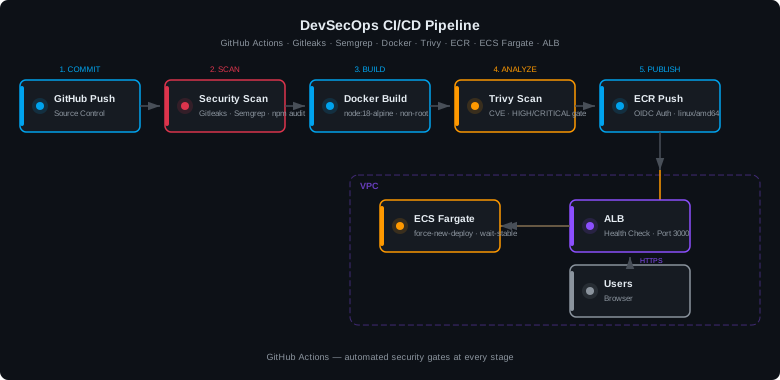
This project documents my experience building an end-to-end DevSecOps CI/CD pipeline for a containerized Node.js application on AWS. The goal was to ship code from a GitHub push all the way to a live ECS Fargate service — with automated security scanning baked in at every stage. Security is not a gate at the end; it runs in parallel with every build.
main.
Application Architecture
The stack uses the following AWS services and tools:
- GitHub Actions — CI/CD orchestration, three-stage pipeline
- Amazon ECR — private Docker image registry
- Amazon ECS Fargate — serverless container runtime (no EC2 to manage)
- Application Load Balancer (ALB) — routes internet traffic to ECS tasks
- AWS IAM OIDC — keyless authentication from GitHub Actions to AWS
- Amazon VPC — isolated network with security groups and subnets
Dockerfile: Hardening the Container
The Dockerfile was iteratively hardened to follow container security best practices: pinned base image version, OS patch layer, production-only dependencies, and a non-root user to prevent privilege escalation inside the container.
# Pinned to a specific patch version — no surprise upgrades
FROM node:18.20-alpine3.21

# Patch all OS packages at build time
RUN apk update && apk upgrade

WORKDIR /app

# Copy dependency manifests first for layer caching
COPY package*.json ./

# Install production dependencies only
RUN npm ci --only=production

# Copy application source
COPY . .

# Create a non-root user and group
RUN addgroup -S appgroup && adduser -S appuser -G appgroup
RUN chown -R appuser:appgroup /app

# Drop root — run as unprivileged user
USER appuser

EXPOSE 3000
CMD ["node", "server.js"]
alpine3.19 base image as end-of-life with no security patches. Updated to alpine3.21 to resolve the finding.
Security Scanning: Shift-Left Approach
Stage 1 — Secret Detection with Gitleaks
Gitleaks scans the entire git history for secrets, API keys, and credentials before any build begins. Using the official gitleaks/gitleaks-action@v2, it runs on every push and will fail the pipeline immediately if any secret pattern is found.
Stage 2 — Dependency Audit with npm audit
npm audit --audit-level=high checks all installed packages against the Node.js security advisory
database. The pipeline only fails on HIGH or CRITICAL severity
vulnerabilities, allowing moderate findings from deeply-nested transitive dependencies
(that have no upstream fix yet) to pass without blocking releases.
Stage 3 — SAST with Semgrep
Semgrep performs static application security testing against the Node.js source using three rulebooks: p/nodejs, p/owasp-top-ten, and p/secrets. It scans for injection vulnerabilities, insecure coding patterns, and hardcoded credentials.
Stage 4 — Container Vulnerability Scan with Trivy
After Docker build, Aqua Security's Trivy scans the built image for known CVEs in both OS packages and application dependencies. Results are output in SARIF format and uploaded to GitHub Security tab for visibility across the team.
- uses: aquasecurity/trivy-action@master
  with:
    image-ref: '${{ secrets.ECR_REPOSITORY }}:latest'
    format:    sarif
    output:    trivy-results.sarif
    exit-code: '0'          # report only — do not fail pipeline
    severity:  HIGH,CRITICAL

- uses: github/codeql-action/upload-sarif@v3
  if: always()
  with:
    sarif_file: trivy-results.sarif
GitHub Actions CI/CD Pipeline
The pipeline has three jobs that run in sequence: security-scan → build-scan-push → deploy.
name: DevSecOps CI/CD Pipeline

on:
  push:
    branches: [main]

permissions:
  id-token: write        # Required for OIDC token
  contents: read
  security-events: write # Required for SARIF upload

jobs:

  security-scan:
    runs-on: ubuntu-latest
    steps:
      - uses: actions/checkout@v4
        with: { fetch-depth: 0 }

      - uses: gitleaks/gitleaks-action@v2
        env: { GITHUB_TOKEN: '${{ secrets.GITHUB_TOKEN }}' }

      - run: npm audit --audit-level=high

      - uses: returntocorp/semgrep-action@v1
        with: { config: 'p/nodejs p/owasp-top-ten p/secrets' }

  build-scan-push:
    needs: security-scan
    runs-on: ubuntu-latest
    steps:
      - uses: actions/checkout@v4

      - uses: aws-actions/configure-aws-credentials@v4
        with:
          role-to-assume: '${{ secrets.AWS_ROLE_ARN }}'
          aws-region:     '${{ secrets.AWS_REGION }}'
          audience:       sts.amazonaws.com

      - uses: aws-actions/amazon-ecr-login@v2

      - run: docker build --platform linux/amd64 -t ${{ secrets.ECR_REPOSITORY }} .

      - uses: aquasecurity/trivy-action@master
        with:
          image-ref: '${{ secrets.ECR_REPOSITORY }}:latest'
          format:    sarif
          output:    trivy-results.sarif
          exit-code: '0'
          severity:  HIGH,CRITICAL

      - uses: github/codeql-action/upload-sarif@v3
        if: always()
        with: { sarif_file: trivy-results.sarif }

      - run: |
          IMAGE=${{ secrets.AWS_ACCOUNT_ID }}.dkr.ecr.${{ secrets.AWS_REGION }}.amazonaws.com/${{ secrets.ECR_REPOSITORY }}:latest
          docker tag ${{ secrets.ECR_REPOSITORY }}:latest $IMAGE
          docker push $IMAGE

  deploy:
    needs: build-scan-push
    runs-on: ubuntu-latest
    steps:
      - uses: aws-actions/configure-aws-credentials@v4
        with:
          role-to-assume: '${{ secrets.AWS_ROLE_ARN }}'
          aws-region:     '${{ secrets.AWS_REGION }}'
          audience:       sts.amazonaws.com

      - run: aws ecs update-service --cluster ${{ secrets.ECS_CLUSTER }} --service ${{ secrets.ECS_SERVICE }} --force-new-deployment

      - run: aws ecs wait services-stable --cluster ${{ secrets.ECS_CLUSTER }} --services ${{ secrets.ECS_SERVICE }}
Keyless AWS Authentication with OIDC
Instead of storing long-lived AWS access keys as GitHub secrets, the pipeline uses OpenID Connect (OIDC) to exchange a short-lived GitHub Actions token for temporary AWS credentials. This eliminates a major credential exposure risk.
- Create an IAM OIDC Identity Provider in AWS pointing to
token.actions.githubusercontent.com - Set the Audience to
sts.amazonaws.com(exact spelling matters) - Create an IAM Role with a trust policy that allows the specific GitHub repo to assume it
- Attach policies for ECR push and ECS update-service
- Store the Role ARN as a GitHub secret (
AWS_ROLE_ARN)
sts.amazonasws.com (extra "as"). This caused every pipeline run to fail with an "Incorrect token audience" error. Always verify the provider config with aws iam get-open-id-connect-provider.
AWS ECS Fargate Deployment
ECS Task Definition
The task definition specifies the container image URI from ECR, port mapping (3000:3000), CPU/memory allocation, and the awsvpc network mode required for Fargate. The container name and port must match what the ALB target group references exactly.
Application Load Balancer
The ALB receives internet traffic on port 3000 and forwards it to an IP-type target group. The target group type must be IP (not Instance) when using awsvpc network mode — using an Instance-type target group causes an incompatibility error when creating the ECS service.
/health, not the default /. The Express app returns {"status":"healthy"} at /health with HTTP 200.
Create the ECS Service (CLI)
aws ecs create-service \
  --cluster food-menu-cluster \
  --service-name food-menu-service \
  --task-definition food-menu-task:REVISION \
  --desired-count 1 \
  --launch-type FARGATE \
  --network-configuration "awsvpcConfiguration={subnets=[subnet-xxx,subnet-yyy],securityGroups=[sg-xxx],assignPublicIp=ENABLED}" \
  --load-balancers "targetGroupArn=arn:aws:elasticloadbalancing:...,containerName=food-menu-container,containerPort=3000"
Security Controls
- Keyless OIDC authentication — no static AWS credentials stored anywhere
- Pinned base image —
node:18.20-alpine3.21prevents unexpected dependency changes - OS patch layer —
apk update && apk upgradeapplies Alpine patches at every build - Non-root container user —
appuserprevents privilege escalation if the app is compromised - Production-only dependencies —
npm ci --only=productionreduces attack surface - Secret scanning on every push — Gitleaks checks full git history
- SAST on every push — Semgrep OWASP Top 10 and secrets rulebooks
- Container CVE scanning — Trivy reports HIGH/CRITICAL findings to GitHub Security tab
- .dockerignore — excludes
.env,.git, andnode_modulesfrom the build context - VPC security groups — ECS tasks only accept traffic from the ALB security group on port 3000
Lessons Learned
- OIDC audience typos break everything silently — Always verify the OIDC provider client ID list with
aws iam get-open-id-connect-provider. A single character typo causes cryptic "Incorrect token audience" failures that look like a role trust policy issue. - Target group type must match network mode — ECS Fargate with awsvpc requires an IP-type target group, not an Instance-type. Creating the wrong type at the start costs a full ECS service recreate.
- ALB security group egress matters — The ALB won't reach the container unless its outbound security group explicitly allows the container port (3000). A port-80-only egress rule caused every health check to time out.
- OCI vs Docker image format — BuildKit (enabled by default) produces OCI-format images that ECR's older scanning engine rejects with
UnsupportedImageTypeException. SettingDOCKER_BUILDKIT=0produces a compatible Docker V2 image. - Alpine EOL base images have unfixable CVEs — Trivy will report numerous unfixable vulnerabilities on end-of-life Alpine versions. Updating the base image is the only fix — patching individual packages does not help.
- Transitive npm CVEs are often unfixable — Some HIGH-severity findings (e.g., in
tar,cross-spawn) have no available patch because the direct dependency hasn't released a fix. Document and accept with a risk decision rather than blocking the pipeline indefinitely. - ECS service load balancer config is immutable — You cannot add or change the ALB target group on an existing ECS service. Delete and recreate the service if the load balancer attachment is wrong.
GitHub Secrets Required
- AWS_ROLE_ARN — IAM role ARN for OIDC assumption
- AWS_REGION — AWS region (e.g.,
us-east-2) - AWS_ACCOUNT_ID — 12-digit AWS account ID
- ECR_REPOSITORY — ECR repository name (e.g.,
food-menu-service) - ECS_CLUSTER — ECS cluster name
- ECS_SERVICE — ECS service name
References
- AWS Documentation — Amazon ECS Fargate
- AWS Documentation — GitHub OIDC Identity Provider
- Aqua Security — Trivy Vulnerability Scanner
- Gitleaks — Secret Detection Tool
- Semgrep — Static Analysis for Security
- Docker Documentation — Dockerfile Best Practices