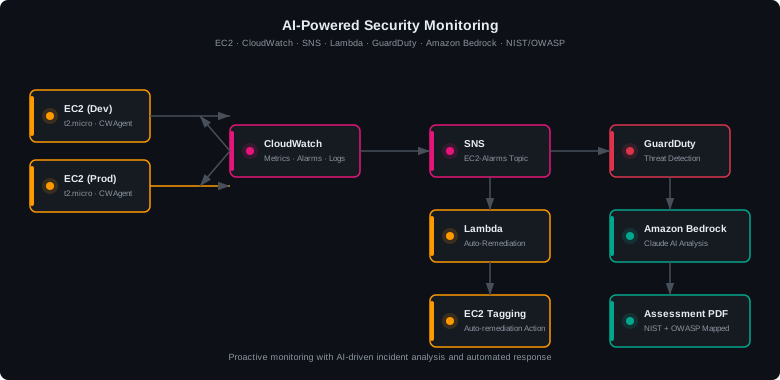
This project documents my experience building a proactive security monitoring system for CloudGuard Financial Services on AWS. The goal was to detect threats in real time, auto-remediate issues before they escalate, and use AI to accelerate incident analysis — turning what used to be hours of manual log review into structured, actionable reports in seconds.
Architecture Overview
The system uses the following AWS services in an integrated pipeline:
- Amazon EC2 — Dev and Prod environments running Amazon Linux 2023
- Amazon CloudWatch — custom metrics via CWAgent, alarms for CPU and disk usage
- AWS SNS — alarm notification routing to email and Lambda
- AWS Lambda — serverless auto-remediation that tags affected instances
- AWS GuardDuty — ML-powered threat detection analyzing VPC flow logs and DNS
- Amazon Bedrock (Claude) — AI-powered analysis of security findings
- VPC/NACLs — network-level remediation blocking reconnaissance traffic
CloudWatch Monitoring with Custom Metrics
AWS provides basic CPU monitoring out of the box, but disk usage and memory require the
CloudWatch Agent. I installed the agent on both EC2 instances with a custom
configuration that publishes disk, memory, and CPU metrics every 60 seconds to a
CWAgent namespace.
Two alarms were configured to detect threshold breaches:
- DevInstance-HighCPU — triggers when CPU utilization exceeds 85% for 1 minute
- ProdInstance-LowDisk — triggers when disk usage exceeds 80% for 1 minute
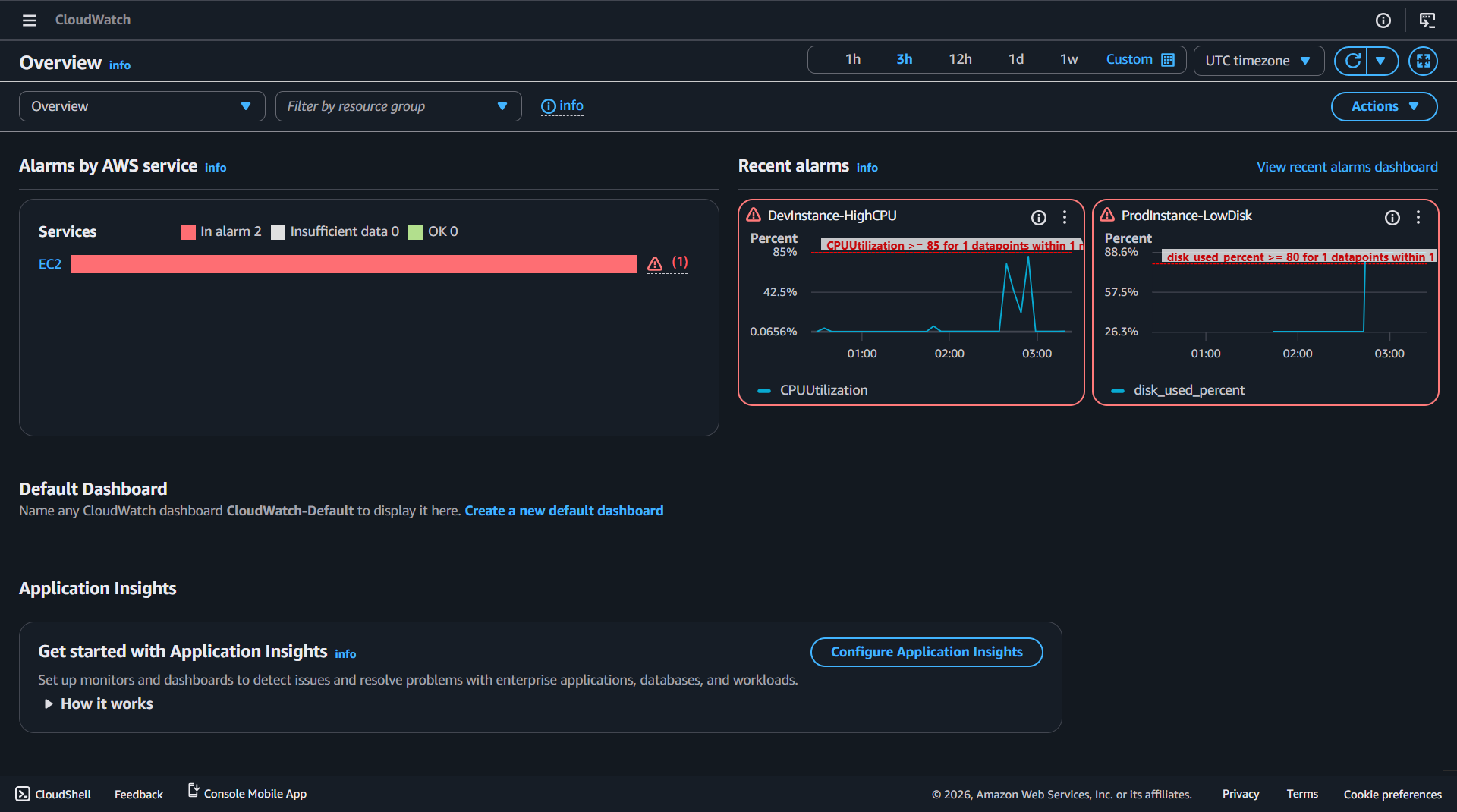
host as the dimension rather than InstanceId. Alarms must match these exact dimensions or they will remain in INSUFFICIENT_DATA.
Automated Remediation with Lambda
When an alarm fires, SNS delivers the notification to a Lambda function that automatically tags the affected EC2 instance with the issue type. This gives the operations team instant visibility into which instances have active issues without requiring manual investigation.
# Determine issue type from alarm name
if "CPU" in alarm_name.upper():
    issue_tag = "HighCPU"
elif "DISK" in alarm_name.upper():
    issue_tag = "LowDisk"

# Tag the instance
ec2.create_tags(
    Resources=[instance_id],
    Tags=[
        {"Key": "AutoRemediation", "Value": "True"},
        {"Key": "Issue", "Value": issue_tag},
        {"Key": "AlarmName", "Value": alarm_name},
    ]
)
host (e.g., ip-10-10-2-74.ec2.internal) instead of an instance ID. The Lambda function includes a hostname-to-instance-ID resolution fallback using ec2.describe_instances.
GuardDuty Threat Detection
AWS GuardDuty continuously monitors VPC flow logs, DNS queries, and CloudTrail events using machine learning to detect threats. I simulated a reconnaissance attack by running an aggressive nmap port scan from the Dev server against the Prod server:
# Aggressive scan: 1000 ports with service version detection
sudo nmap -Pn -p 1-1000 -T4 -A 10.10.2.74
GuardDuty detected the scanning activity and generated a Recon:EC2/PortProbeUnprotectedPort finding. I then implemented a Network ACL to block the scanning traffic at the network level:
- Rule #100 — Deny TCP ports 1-1000 from Dev-Server IP (10.10.2.126/32)
- Rule #200 — Allow all other traffic
After applying the NACL, a follow-up nmap scan confirmed all 1000 ports showed as filtered — the remediation was verified.
AI-Powered Security Analysis with Amazon Bedrock
The AI analyzer script retrieves GuardDuty findings and CloudWatch alarm data via boto3, formats them into a structured prompt, and sends them to Amazon Bedrock (Claude) for analysis. The AI returns an executive summary, severity assessments, correlation analysis, a prioritized remediation plan, and compliance implications for financial services.
body = json.dumps({
    "anthropic_version": "bedrock-2023-05-31",
    "max_tokens": 2048,
    "messages": [{"role": "user", "content": prompt}]
})
response = bedrock.invoke_model(
    modelId="us.anthropic.claude-3-5-haiku-20241022-v1:0",
    body=body,
    contentType="application/json",
    accept="application/json"
)
Security Assessment PDF
The final deliverable is a portfolio-ready security assessment PDF generated with fpdf2. It documents five findings mapped to both NIST AI RMF and OWASP LLM Top 10 frameworks:
- [HIGH] No authentication on EC2 monitoring endpoints (OWASP LLM06, NIST MEASURE 2.7)
- [HIGH] Reconnaissance detected between environments (NIST MANAGE 2.3)
- [MEDIUM] CloudWatch alarm thresholds not tuned (NIST MANAGE 4.1)
- [MEDIUM] AI analyzer output not validated before action (OWASP LLM02/LLM09, NIST GOVERN 3.2)
- [MEDIUM] Lambda function has broader permissions than needed (NIST GOVERN 1.2)
Security Controls
- Least-privilege IAM — CloudWatch agent and Lambda use scoped roles with minimum permissions
- Automated detection — CloudWatch alarms and GuardDuty detect issues without human intervention
- Auto-remediation — Lambda responds faster than manual intervention, tagging affected instances immediately
- AI-assisted analysis — Bedrock accelerates incident triage without replacing human judgment
- Defense in depth — security groups + NACLs + GuardDuty provide layered protection
- Human-in-the-loop — AI recommends, human approves (NIST AI RMF GOVERN 3.2)
- Sanitized AI inputs — never send raw credentials or PII to LLM APIs
- Incident documentation — every incident gets a structured report for compliance
Lessons Learned
- CWAgent dimensions differ from EC2 built-in metrics — CWAgent uses
hostinstead ofInstanceId. Alarms configured with the wrong dimension stay in INSUFFICIENT_DATA permanently. - Security group egress rules block outbound access — EC2 instances couldn't install packages because the security group only allowed SSH outbound. All-traffic egress is needed for package managers.
- Non-default VPCs require explicit internet gateway routes — Launching instances in a custom VPC without an IGW route means no internet access, even with a public IP assigned.
- Bedrock model IDs change over time — The original Claude 3 Sonnet model ID was marked legacy. Use cross-region inference profiles (e.g.,
us.anthropic.claude-3-5-haiku-20241022-v1:0) for current access. - PowerShell BOM breaks AWS CLI JSON parsing —
Out-Fileadds a hidden byte order mark. Use[System.IO.File]::WriteAllText()for clean JSON files. - GuardDuty findings take time — VPC flow log analysis is near-real-time but findings can take 30-60 minutes to appear. Plan testing around this delay.
Compliance Frameworks
NIST AI Risk Management Framework
- GOVERN 1.5 — Ongoing monitoring and periodic review (Steps 3, 6)
- GOVERN 3.2 — Human-AI configurations and oversight (Steps 6, 7)
- MAP 3.2 — Potential costs from AI errors or system failures (Step 6)
- MEASURE 2.7 — AI system security and resilience evaluation (Steps 6, 8)
- MANAGE 2.3 — Respond to and recover from previously unknown risks (Steps 5, 6)
- MANAGE 4.1 — Post-deployment monitoring plans (Steps 3, 6)
OWASP LLM Top 10
- LLM01 — Prompt Injection — GuardDuty findings could contain crafted strings; sanitize before sending
- LLM02 — Insecure Output Handling — AI remediation recommendations must be reviewed by a human before execution
- LLM06 — Sensitive Information Disclosure — CloudWatch logs may contain IP addresses and instance IDs; Bedrock keeps data in-account
- LLM09 — Overreliance — AI analysis assists the analyst; it does not replace human judgment
References
- AWS Documentation — Amazon CloudWatch Agent
- AWS Documentation — AWS Lambda
- AWS Documentation — Amazon GuardDuty
- AWS Documentation — Amazon Bedrock
- NIST — AI Risk Management Framework (AI RMF 1.0)
- OWASP — LLM Top 10