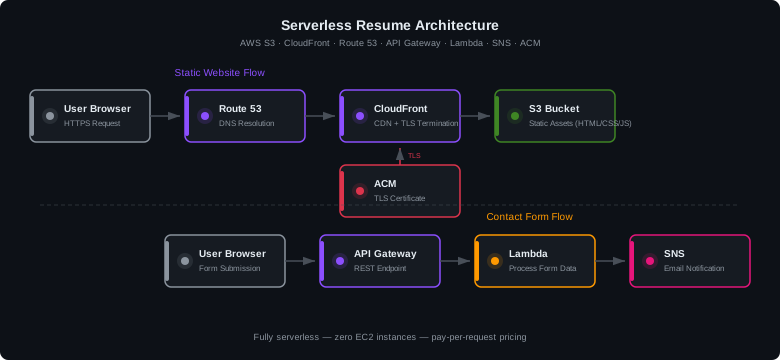
This project documents my experience building a serverless personal website on AWS. I didn't want to run or maintain servers, pay for idle Compute or EC2 time, or deal with patching and scaling. So I built a serverless site architecture using S3 for static hosting, CloudFront for global content delivery and TLS, and a contact form backend powered by API Gateway, Lambda, and SNS with Google reCAPTCHA for bot prevention.
Application Architecture
The application architecture uses the following AWS services:
- Amazon S3 — stores HTML, CSS, JS, and image assets in a private bucket
- Amazon CloudFront — serves content globally via edge locations with HTTPS
- Amazon Route 53 — domain registration and DNS management
- AWS Certificate Manager (ACM) — free TLS certificate with DNS validation
- Amazon API Gateway — REST API endpoint for the contact form
- AWS Lambda — Node.js function that processes form submissions
- Amazon SNS — sends email notifications for each form submission
Create S3 Bucket for Static Hosting
- Open the Amazon S3 console
- Click Create bucket and name it (e.g., your domain name)
- Leave Block all public access enabled — CloudFront OAC will handle access
- Create the bucket, then upload your website files (index.html, CSS, JS, images)
Create SNS Topic and Subscription
- Open the SNS Console and select Topics
- Click Create topic → type Standard
- Create a Subscription — select Email protocol and enter your email address
- Check your inbox and confirm the subscription
Build Serverless Backend on AWS Lambda
- Open AWS Lambda and select Create function
- Select Author from scratch, choose Node.js runtime
- Enter a function name (e.g., contactFormHandler)
- Attach an IAM role with SNS publish permissions
The Lambda function verifies the reCAPTCHA token with Google's API, validates the input fields, then publishes a formatted message to the SNS topic:
import https from 'https';
import { SNSClient, PublishCommand } from '@aws-sdk/client-sns';

const sns     = new SNSClient({});
const TOPIC   = process.env.SNS_TOPIC_ARN;
const SECRET  = process.env.RECAPTCHA_SECRET;
const ALLOWED = process.env.ALLOWED_ORIGIN;

export const handler = async (event) => {
  const body = JSON.parse(event.body);
  const { name, email, subject, message, captcha } = body;

  // Verify reCAPTCHA token with Google
  const captchaOk = await verifyCaptcha(captcha);
  if (!captchaOk) return respond(403, 'Captcha failed');

  // Publish to SNS
  await sns.send(new PublishCommand({
    TopicArn: TOPIC,
    Subject:  `Contact: ${subject}`,
    Message:  `From: ${name} (${email})\n\n${message}`,
  }));

  return respond(200, 'Message sent');
};
Deploy REST API with API Gateway
- Open the API Gateway console and select REST API
- Create a new resource (e.g., /contact)
- Create a POST method → integration type Lambda Function
- Enable CORS on the resource — set Access-Control-Allow-Origin to your domain
- Deploy the API to a stage (e.g., prod)
- Copy the Invoke URL for use in your frontend JavaScript
'https://yoururl.com'
Set Up a Serverless Website with CloudFront
Create the CloudFront Distribution
- Open CloudFront and click Create distribution
- Set Origin domain to your S3 bucket (select from dropdown)
- Under Origin access, select Origin access control settings (OAC)
- Click Create new OAC → keep defaults → Create
- Set Viewer protocol policy to Redirect HTTP to HTTPS
- Under Response headers policy, select SecurityHeadersPolicy (AWS managed)
- Set Default root object to index.html
- Click Create distribution
- Copy the S3 bucket policy from the blue banner and paste it into your S3 bucket permissions
S3 Bucket Policy for OAC
{
  "Version": "2012-10-17",
  "Statement": [{
    "Sid": "AllowCloudFrontServicePrincipal",
    "Effect": "Allow",
    "Principal": {
      "Service": "cloudfront.amazonaws.com"
    },
    "Action": "s3:GetObject",
    "Resource": "arn:aws:s3:::your-bucket-name/*",
    "Condition": {
      "StringEquals": {
        "AWS:SourceArn": "arn:aws:cloudfront::ACCOUNT_ID:distribution/DIST_ID"
      }
    }
  }]
}
Configure Custom Domain with Route 53
- Register a domain through Route 53 (or transfer an existing one)
- In Route 53 Hosted Zones, select your domain
- Create an A record — toggle Alias on → route to CloudFront distribution
- Create a second A record for www pointing to the same CloudFront distribution
Request SSL Certificate with AWS Certificate Manager
- Switch to the us-east-1 (N. Virginia) region — required for CloudFront
- Open ACM and click Request a certificate
- Select Public certificate → enter your domain name (e.g., sdmcqueen.com)
- Add an additional name: *.sdmcqueen.com for wildcard coverage
- Choose DNS validation → click Request
- Click Create records in Route 53 to automatically add the CNAME validation records
- Wait for status to change to Issued (usually 5-15 minutes)
Attach Certificate to CloudFront
- Go to your CloudFront distribution → General → Edit
- Add Alternate domain names (CNAMEs): your apex domain and www subdomain
- Under Custom SSL certificate, select the ACM certificate
- Set Security policy to TLSv1.2_2021
- Save changes and wait for deployment to complete
Frontend: Contact Form with reCAPTCHA
The contact form uses Google reCAPTCHA v2 to prevent automated submissions. The reCAPTCHA widget is rendered in the form, and the token is sent along with the POST request to API Gateway:
const API_URL = 'https://<api-id>.execute-api.us-east-1.amazonaws.com/prod/contact';

contactForm.addEventListener('submit', async (e) => {
  e.preventDefault();

  const captcha = grecaptcha.getResponse();
  if (!captcha) { /* show error */ return; }

  const payload = {
    name:    document.getElementById('name').value,
    email:   document.getElementById('email').value,
    subject: document.getElementById('subject').value,
    message: document.getElementById('message').value,
    captcha: captcha,
  };

  const res = await fetch(API_URL, {
    method:  'POST',
    headers: { 'Content-Type': 'application/json' },
    body:    JSON.stringify(payload),
  });
});
Security Controls
- S3 bucket is private — public access blocked at the bucket level; only CloudFront OAC can retrieve objects
- TLS 1.2+ enforced — ACM certificate on CloudFront with minimum TLSv1.2_2021 security policy
- Security headers — AWS managed SecurityHeadersPolicy applies HSTS, X-Content-Type-Options, and X-Frame-Options
- CORS origin-restricted — API Gateway only accepts requests from the production domain
- reCAPTCHA v2 — Lambda verifies the captcha token server-side before processing
- IAM least-privilege — Lambda role only has permissions for SNS:Publish on the specific topic ARN
- Input validation — Lambda sanitizes and validates all form fields before publishing
Lessons Learned
- OAI is deprecated — The CloudFront console no longer shows Origin Access Identity. Use Origin Access Control (OAC) instead, which provides more granular S3 bucket policy controls.
- ACM must be in us-east-1 — CloudFront only accepts certificates from N. Virginia, regardless of your S3 bucket region.
- DNS propagation affects ACM — Newly registered domains may take time for nameserver records to propagate. ACM DNS validation won't succeed until the CNAME records are resolvable.
- CORS requires single quotes — API Gateway mapping expressions need the origin URL wrapped in single quotes or you'll get an "Invalid mapping expression" error.
- SecurityHeadersPolicy is free — Custom response header policies require a CloudFront paid plan, but the AWS managed SecurityHeadersPolicy provides common security headers at no cost.
References
- AWS Documentation — CloudFront Origin Access Control
- AWS Documentation — Certificate Manager DNS Validation
- AWS Documentation — API Gateway CORS Configuration
- Google reCAPTCHA Developer Guide