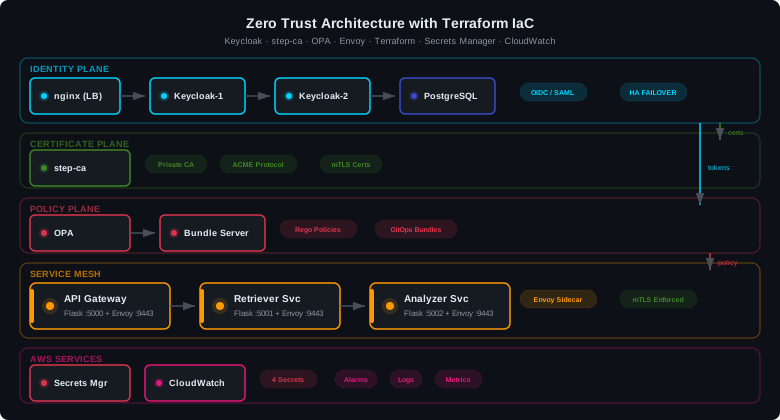
This project documents my experience building a production-grade Zero Trust Architecture deployed
entirely through Terraform Infrastructure as Code. The goal was to implement NIST SP 800-207
principles — default deny, continuous verification, microsegmentation — in a 13-container
stack that provisions with a single terraform apply command and destroys in 30 seconds.
Architecture Overview
The architecture implements five Zero Trust planes, each managed by Terraform:
- Identity Plane — Keycloak HA (2 nodes) behind nginx TLS load balancer, backed by PostgreSQL. Issues JWT tokens for every request.
- Certificate Plane — step-ca private CA with ACME protocol. Issues and auto-renews TLS certificates for the service mesh.
- Policy Plane — OPA with Rego policies served via bundle server (GitOps pattern). Default deny on every request.
- Secrets Plane — AWS Secrets Manager stores all credentials. Zero hardcoded passwords in code or config.
- Observability Plane — AWS CloudWatch alarms, logs, and metrics for continuous monitoring.
Keycloak HA Identity Cluster
Two Keycloak nodes behind an nginx TLS load balancer, backed by PostgreSQL. Infinispan TCP clustering enables session replication — if one node dies, the other serves requests without session loss. The nginx load balancer terminates TLS using a Terraform-generated self-signed certificate.
resource "docker_container" "keycloak_1" {
  name    = "keycloak-1"
  image   = docker_image.keycloak.image_id
  command = ["start"]  # NOT --optimized (see warning below)
  env = [
    "KC_DB=postgres",
    "KC_DB_URL=jdbc:postgresql://keycloak-db:5432/keycloak",
    "KC_HOSTNAME_STRICT=false",
    "KC_PROXY_HEADERS=xforwarded",
    "KC_HTTP_ENABLED=true",
    "KC_HEALTH_ENABLED=true",
    "KC_CACHE=ispn",
    "KC_CACHE_STACK=tcp",  # Infinispan clustering for HA
    "KEYCLOAK_ADMIN=admin",
    "KEYCLOAK_ADMIN_PASSWORD=${var.keycloak_admin_password}",
  ]
}
command = ["start", "--optimized"] skips the build step, so KC_DB=postgres is silently ignored and Keycloak crash-loops trying to parse a PostgreSQL URL as H2. Always use command = ["start"] with stock images.
Envoy Service Mesh & Sidecar Pattern
Each microservice runs with an Envoy sidecar proxy sharing the same network namespace via
Docker’s network_mode = "container:${...}".
The sidecar handles TLS termination, authorization, and routing — the application code
never touches security. This is the same pattern used by Istio and AWS App Mesh in production.
# Parent container owns the network namespace and ports
resource "docker_container" "api_gateway" {
  name  = "api-gateway"
  image = docker_image.api_gateway.image_id
  ports {
    internal = 9443
    external = 9443
  }
  networks_advanced {
    name = data.docker_network.mesh.id
  }
}

# Envoy sidecar shares parent's network — no ports here
resource "docker_container" "envoy_gw" {
  name         = "envoy-api-gateway"
  image        = docker_image.envoy.image_id
  network_mode = "container:${docker_container.api_gateway.id}"
  depends_on   = [docker_container.api_gateway]
}
network_mode = "container:..." shares the network namespace. The sidecar has no network of its own — publishing ports on it causes a “conflicting options” error. All ports must be declared on the parent container.
OPA Policy Engine
Open Policy Agent evaluates every request against Rego policies distributed via a bundle server. The bundle is a tarball served by nginx — update the Rego file in Git, rebuild the bundle, and OPA picks up the new policy automatically within 10–30 seconds. This is the GitOps pattern for policy management.
package authz

default allow := false

allow if {
    input.method == "GET"
    input.path == "/health"
}

allow if {
    valid_token
    has_required_role
}
step-ca Private Certificate Authority
Smallstep step-ca provides automated certificate issuance via ACME protocol — the same protocol Let’s Encrypt uses. It replaces AWS ACM Private CA ($400/month) with a free, self-hosted alternative. Certificates are short-lived and auto-renewed, eliminating the class of attacks that exploit expired or unrotated certificates.
resource "docker_container" "step_ca" {
  name  = "step-ca"
  image = docker_image.step_ca.image_id
  env = [
    "DOCKER_STEPCA_INIT_NAME=FedSecure ZTA CA",
    "DOCKER_STEPCA_INIT_DNS_NAMES=step-ca,localhost",
    "DOCKER_STEPCA_INIT_REMOTE_MANAGEMENT=true",
    "DOCKER_STEPCA_INIT_ACME=true",
  ]
  ports {
    internal = 9000
    external = 9000
  }
  healthcheck {
    test = ["CMD", "step", "ca", "health",
            "--ca-url", "https://localhost:9000",
            "--root", "/home/step/certs/root_ca.crt"]
  }
}
AWS Secrets Manager
Four secrets stored in AWS Secrets Manager — zero hardcoded passwords anywhere in the codebase. Terraform creates both the secret and its initial version, so credentials are provisioned as part of the infrastructure lifecycle.
resource "aws_secretsmanager_secret" "keycloak_admin" {
  name = "${var.project_name}/keycloak-admin"
  tags = { Project = var.project_name }
}
resource "aws_secretsmanager_secret_version" "keycloak_admin" {
  secret_id     = aws_secretsmanager_secret.keycloak_admin.id
  secret_string = jsonencode({
    username = "admin",
    password = var.keycloak_admin_password
  })
}
Verification Suite
An 11-test automated verification script validates the entire stack — from individual
container health to end-to-end authorization flow. Mesh service health checks use
docker exec with Python’s urllib (Flask containers don’t include curl).
# Test: Default deny (no token = rejected)
DENIED=$(curl -s http://localhost:9443/api/v1/data | \
  python3 -c "import sys,json; print(json.load(sys.stdin).get('error',''))")
if echo "$DENIED" | grep -q "missing token"; then
  echo "PASS: Default deny (no token)"
fi
Security Controls
- Default deny — OPA:
default allow := false - Microsegmentation — 3 isolated Docker networks: frontend, mesh, data (internal-only)
- mTLS-ready — step-ca ACME + Envoy sidecars at every service
- Secrets management — AWS Secrets Manager, no hardcoded passwords
- HA identity — 2 Keycloak nodes with Infinispan clustering, nginx TLS load balancer
- Continuous monitoring — CloudWatch alarms for auth failures and cert expiry
- Infrastructure as Code — Terraform state tracking, drift detection, reproducible deploys
Lessons Learned
- Keycloak
--optimizedflag — causes silent failures with PostgreSQL on stock Docker images. The build step is required to switch from H2 to PostgreSQL drivers. - nginx DNS timing — crashes at startup if upstream hostnames aren’t resolvable yet. Fix: add
resolver 127.0.0.11for Docker DNS anddepends_onfor both Keycloak nodes. - Sidecar port ownership — Docker’s sidecar pattern requires all ports on the parent container. Publishing ports on the sidecar causes a “conflicting options” error.
- Per-service Envoy configs — each sidecar needs its own YAML config with the correct
stat_prefixand upstream port. Sharing a single config causes routing failures. - Terraform stale plans — crash-looping containers change state between
planandapply. Useterraform apply -auto-approveto plan and apply atomically. - Container health checks without curl — Flask containers don’t include curl. Use
docker execwithpython3 urllib.requestinstead.
NIST SP 800-207 Zero Trust Mapping
- Tenet T1 — All data sources and computing services are resources. Each of the 13 containers is treated as an independent resource with its own identity and policy evaluation.
- Tenet T2 — All communication is secured regardless of network location. TLS on nginx, mTLS-ready Envoy mesh, internal-only data network.
- Tenet T3 — Access to individual resources is granted on a per-session basis. Keycloak issues short-lived JWT tokens with TTL.
- Tenet T4 — Access is determined by dynamic policy. OPA evaluates every request against Rego rules in real time.
- Tenet T6 — Authentication and authorization are strictly enforced before access is granted. Keycloak (authn) + OPA (authz) + Envoy (enforcement) pipeline.
Cost Analysis
step-ca replaces AWS ACM Private CA ($400/month) with a free, self-hosted alternative. All 13 containers run locally on Docker at zero cost. The only AWS charges are Secrets Manager (4 secrets at ~$2.40/month) and CloudWatch (~$4.00/month for logs, alarms, and metrics). Total: ~$6.40/month for a production-grade Zero Trust stack.
References
- NIST SP 800-207 — Zero Trust Architecture
- HashiCorp — Terraform Documentation
- Keycloak — Server Administration Guide
- Envoy Proxy — Configuration Reference
- Open Policy Agent — Policy Language (Rego)
- Smallstep — step-ca Documentation
- AWS — Secrets Manager User Guide
- AWS — CloudWatch User Guide